Wagonflow 4 is the first version specifically for the Windows platform and will run on Windows 95 or higher. It may run on other OSs using an emulator but I cannot vouch for that. It was a simple port using the Delphi language and it doesn’t look so good on the larger screens many of you now have. It will run on windows 10 but some users have reported that, in order to obtain a readable display, they need to reduce the resolution of their monitor to 800 x 600 or even lower. I run on Windows 10 at 1280 x 1024 without little problem. You will need to experiment to see what works for you.
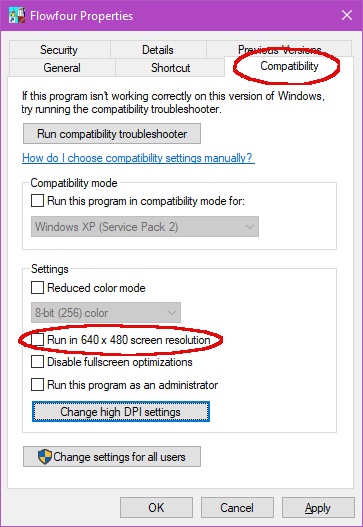
To set a different resolution, right-click the screen shortcut icon, select Properties then click the Compatibility tab, ringed in red here. This gives various options and the one to run in 640 x 480 can be ticked. This will automatically set and reset the resolution each time you run Wagonflow.
I did look at the possibility of rewriting the screen settings to overcome these issues but this proved to be more difficult than expected – there was too much embedded in too many places.
The Help file originally supplied will not open under Windows 10. A recompiled file that will work is now available for existing users who would like it.
Regretfully Wagonflow 4 will not run on Windows 11. The enhanced so-called security features block the program from being installed or even run when manually unpacked. Many modellers have a spare laptop computer running Windows XP or even 95/98 that remain perfectly serviceable. If you don’t have one then these can often be picked up from computer fairs or on-line.